
Summarize and analyze this article with:
Creating more recruitment capacity and improving the productivity of local recruiters (fee earners) are key priorities for many small, medium and large staffing businesses across Australia.
If you run a staffing agency in Australia, you may be facing the same challenge. How can you get more out of your existing recruitment team and create additional capacity without increasing your local headcount?
This is becoming an important consideration for Australian recruitment businesses. According to Bullhorn’s 2026 APAC Industry Trends Report, the majority of staffing leaders are focusing on improving their recruiter productivity and using technology to scale their operations without adding local headcounts.
If this sounds familiar, you’re in the right place. In this blog, you will explore where your ‘recruiters’ time goes, what affects their productivity, and how you can create more capacity from your existing team.
Want To Create More Capacity for Your Australian Staffing Business?
By the end of this blog, you will understand how to:
- Define and measure recruiter productivity.
- Run a simple one-week time audit.
- Identify the tasks taking up your recruiters’ time.
- Decide which activities to keep, automate or assign to a support team.
- Build a 90-day plan to improve recruitment efficiency and measure the results.
Take a Snapshot of Your Team’s Current Recruiter Productivity
Before you take any action to improve your recruiter’s productivity, you need to understand what recruiter productivity is and how your team is performing today.
Let us see what recruiter productivity is.
What is Recruiter Productivity?
Recruiter productivity measures how efficiently your recruiters turn candidate applications and sourcing efforts into quality placements without spending unnecessary time on repetitive administrative tasks.
It is not just about how many calls they make or emails they send, but how effectively they achieve recruitment results.
For example, one of your recruiters might make 40 calls a day but struggle to turn those conversations into interviews. Another recruiter might make fewer calls but submit more suitable candidates and achieve more placements.
Both recruiters are busy. However, the second recruiter is more productive because they achieve better results with fewer calls.

Now that you understand recruiter productivity, let’s look at how your team is performing today.
How Is Your Recruitment Team Performing Today?
To understand your team’s current recruiter productivity, start by looking at how your team spends their working hours and what results they achieve.
For example, your recruiters might spend 15 hours a week on administrative tasks. This leaves less time to source candidates, speak with clients and fill vacancies.
To get a clear picture of your recruitment team’s performance, you will need to dig deep with an audit. And that is the next step for you.
Run a Simple One-Week Time Audit
This simple audit will help you see where your fee earners’ (recruiters’) time goes and how they perform.
Here is what you need to do. You do not have to invest in new software or introduce complicated reporting. A simple shared spreadsheet is enough to start.
All you have to do is ask your recruiters to record the following information during a normal working week:
Task completed: Sourcing, screening, client calls, administration, compliance or internal meeting.
Time spent: How much time does it take for your recruiters to perform each activity?
Task responsibility: Whether the activity requires your consultant’s direct involvement.
Systems used: Which ATS, CRM or other platforms are involved.
Delays experienced: Any repeated work, missing information or follow-ups that slow down the task.
Once you have these answers, you can identify where your recruitment capacity is being lost and analyse your recruiters’ performance.
Run a Recruitment Capacity Audit to Identify Where Time is Being Lost
You now have a better understanding of how your recruiters are spending their working hours. But collecting this information isn’t enough to get the full picture.
Next, you must proceed with the next step: What should you do with it? (the answers you collected from your recruiters above)
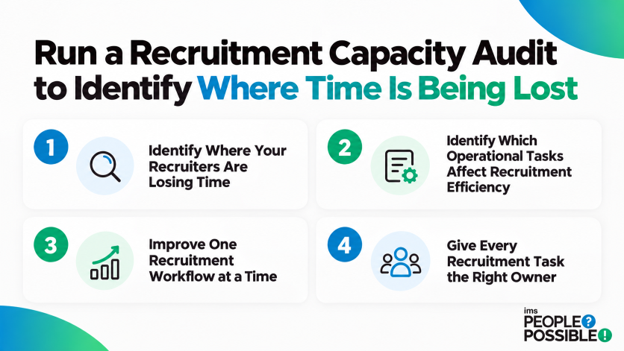
The 4 steps below will help you decide what to do next.
Step 1: Identify Where Your Recruiters are Losing Time
Start by calculating the hours your recruiters spent on each activity during your one-week audit. Then compare the results across your recruitment team.
While reviewing the results, you may find that one consultant spends several hours chasing compliance documents management, while another spends considerable time updating candidate records or coordinating interviews.
As the saying goes, “Time is money.” For your recruitment business, every hour spent on repetitive administrative work means less time to source candidates, speak with clients, and fill vacancies.
However, not every delay comes from administrative work. Some may come from slow client responses, repeated data entry, or inefficient recruitment processes.
To better understand these problems, use the table below to identify what may be affecting your team’s recruitment efficiency.
| Where Recruiters Lose Time | Possible Cause | What Could Help |
| Timesheets and payroll queries | Manual submissions and repeated follow-ups | Digital timesheets or back-office support |
| Compliance documents | Missing paperwork and repeated candidate follow-ups | Dedicated compliance support |
| Client feedback | Delayed responses from hiring managers | Agreed response times and regular follow-ups |
| Candidate database updates | Entering the same information into multiple systems | ATS integration or automation |
| Interview scheduling | Repeated emails and changes in availability | Scheduling tools or recruitment coordination support |
Once you identify the causes, you can decide which problems need process improvements, technology or dedicated recruitment operations outsourcing support.
This will reduce unnecessary recruiter workload and free up time for your local recruiters to focus on placements and client relationships.
Step 2: Identify Which Operational Tasks Affect Recruitment Efficiency
Once you know where your recruiters’ time is being lost, you need to understand which activities require your recruiter’s expertise and which someone else, an offshore recruitment partner, can manage.
For example, assessing whether a candidate suits a specialist vacancy requires your recruiter’s expertise, time, and judgement. However, a trained recruitment support team can often handle scheduling interviews, updating records, and chasing documents.
By separating these activities, you can reduce your recruiter workload and give your billers (consultants) more time for client relationships and placements.
To identify these opportunities, separate your tasks into two groups:
- Consultant-led activities: Work that requires recruitment judgement, client relationships or important candidate decisions.
- Operational support activities: Repeatable tasks that you can handle through structured processes, automation or dedicated recruitment support.
Next, prioritise support tasks based on how much time your recruiters spend on them.
| Priority | Time Spent Per Consultant | Recommended Action |
| High | 5+ hours per week | Review first for automation or outsourcing |
| Medium | 2–5 hours per week | Look for process improvements |
| Low | Under 2 hours per week | Monitor and improve where needed |
These are just suggested time ranges. You can always adjust them based on your staffing agency’s workload and requirements.
Also, pay close attention to compliance tasks. For example, Australian staffing businesses may need to manage licenses, white cards and VEVO checks. Moreover, labour hire licensing requirements also vary by state and territory.
A dedicated offshore recruitment support team can handle compliance administration while your agency maintains the right checks and oversight.
The goal is simple: to improve your recruitment efficiency without affecting candidate quality or compliance.
Also Read: Australian Employment and Labour Laws in 2026
Step 3: Improve One Recruitment Workflow at a Time
Now that you have identified the tasks affecting your recruiter’s productivity, review one recruitment workflow that regularly causes delays.
For example, onboarding a temporary worker may involve collecting documents, completing compliance checks, updating the ATS and sharing information with payroll.
If your recruiters enter the same information into multiple systems, it creates unnecessary work. To improve this, map the process and identify steps you can simplify, automate, or assign to a support team.
This is where recruitment workflow optimisation and recruitment operations outsourcing can help you reduce repetitive tasks and improve recruitment efficiency without increasing the local headcount.
Step 4: Give Every Recruitment Task the Right Owner
Every support recruitment task needs an owner. This matters because without a task owner (offshore support partner), routine work returns to your billers.
For example, your agency may introduce a new onboarding checklist, but if nobody owns document follow-up or the admin tasks, your consultants will have to chase candidates themselves.
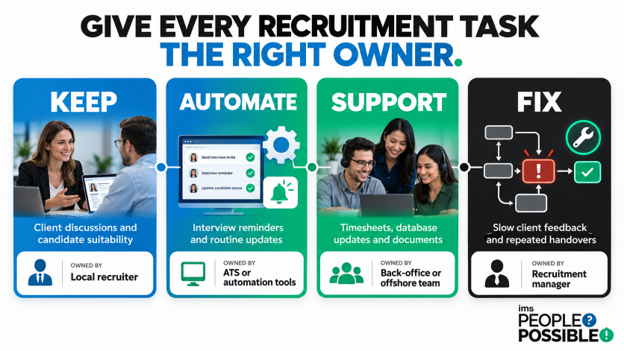
So, to avoid this back-and-forth, divide recruitment tasks into four categories as mentioned in the table below:
| Category | What it means | Example | Suggested owner |
| KEEP | Activities requiring recruiter expertise and judgement
|
Client discussions and final candidate suitability decisions | Local recruiter |
| AUTOMATE | Repeatable activities suitable for technology
|
Interview reminders and routine updates | ATS or automation tools |
| SUPPORT | Operational tasks a trained team can manage | Timesheets, database updates and document collection
|
Offshore recruitment team |
| FIX | Processes affected by unclear responsibilities or delays
|
Slow client feedback or repeated handovers | Recruitment manager or process owner |
By separating these activities as shown in the table above, you can reduce routine workload for your local recruiters while keeping them involved where their expertise matters.
This is also where recruitment operations outsourcing services can become more relevant.
| Related reading: Offshore Staffing for Recruitment Agencies in Australia: What to Outsource First? |
Turn Your Findings into a 90-Day Recruitment Productivity Improvement Plan
Now that you know where your recruiters spend their time, which tasks affect their productivity, and who should manage each activity.
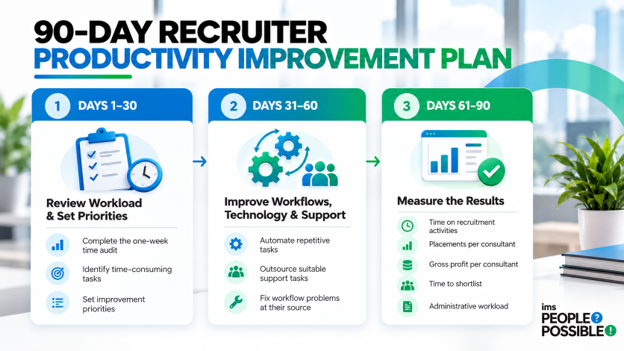
The next step is to put these findings into practice. That’s why we created a proven 90-day plan you can follow to improve recruitment efficiency while giving your team time back to adjust to new processes.
Days 1–30: Review Your Workload and Set Priorities
In the first 30 days of this plan, focus on understanding your current staffing operations.
Complete the one-week time audit, review the results with your consultants and identify the tasks that consume the most time.
Then, use your task ownership plan to decide which activities should remain with recruiters, be automated or receive additional support.
For example, if consultants spend several hours each week chasing timesheets, you could introduce digital timesheets or assign follow-ups to your back-office team.
By the end of the first 30 days, you should have a clear list of priorities and a baseline for measuring improvements.
Days 31–60: Improve Workflows, Technology and Recruitment Support
Once you know which activities need attention, start improving workflows, technology, and recruitment support.
Based on your findings, you can approach this in three ways:
- Automate your repetitive recruitment tasks
- Consider recruitment operations outsourcing for support tasks
- Fix workflow problems at their source
Start with the activities that consume the most time and introduce changes gradually. This will help you reduce unnecessary recruiter workload, improve recruitment efficiency and create more capacity for your local recruiters.
Days 61–90: Measure the results
After completing the first 60 days of the 90-day plan, you should now have improved your workflows, technology, and recruitment support.
In the last phase, you should measure the results.
Compare your team’s current performance with the baseline from your one-week audit to see whether your recruiter productivity and recruitment efficiency have improved.
Moreover, you should focus on these key metrics:
- Time spent on recruitment activities: Are your recruiters spending more time with candidates and clients?
- Placements per consultant: Is your team achieving more placements?
- Gross profit per consultant: Are the improvements you made contributing to your company’s total revenue?
- Time to shortlist: Are suitable candidates reaching your clients faster?
- Administrative workload: Are your recruiters spending less time on repetitive tasks?
Make sure you compare similar periods, as changes in vacancy volumes and client demand can also affect results.
| Also Read: 8 Recruitment Metrics That Reveal Capacity Issues |
Want to know which tasks to automate, outsource or keep in-house?
Download the Recruitment Operations Playbook to identify opportunities to improve your recruitment operations.
Conclusion: Make Recruiter Productivity an Ongoing Business Priority
Improving recruiter productivity is not a one-time activity. As your staffing business grows, your recruiter workload and operational requirements will also change.
That is why you should regularly review how your recruiters spend their time and identify opportunities for recruitment process improvement.
By improving workflows, using technology and considering recruitment operations outsourcing for routine tasks, you can create more capacity without increasing local headcount.
Remember, the goal is not to make your recruiters work harder. It is to help them work more efficiently, focus on client relationships and achieve more placements.