
Summarize and analyze this article with:
Imagine a scenario:
A warehouse client needs 30 associates on Monday.
⬇️
You managed 30 confirmed candidates by Friday.
⬇️
On Monday, only 22 report.
The branch has eight positions to backfill, but “candidate no-show” doesn’t tell the team what went amiss.
“Did the associates get the right reporting instructions?” “Could they not get to the site before the shift?” “Did anyone notice that several hadn’t replied to the final confirmation?”
Candidate drop-off is recruitment-delivery data mine. Understanding where candidates abandoned helps staffing firms see whether speed, communication, job fit, or ownership is breaking down. The goal isn’t to prevent every withdrawal. It’s to stop losing people to problems the agency or client can fix.
Where Candidates Drop Off and What to Fix
The iCIMS 2025 State of Frontline Hiring Report, based on surveys of 1,000 US hourly frontline workers and 1,000 frontline hiring managers, found that 60% of workers had started but not finished a job application. Managers most often identified interviews as the biggest drop-off point (32%), followed by scheduling (20%), onboarding (18%), and application (14%). Those percentages represent managers’ responses, not conversion rates for individual stages.
Application abandonment, interview withdrawals, offer rejections, and first-day no-shows tell you different things. Use the funnel to identify where the loss occurs, then check candidate feedback and workflow records before deciding why.
| Funnel transition | What the drop-off may reveal | What to change |
| Job-ad click → completed application | Unclear pay or shift, forced account creation, long forms, or poor mobile experience | Show pay, shift, and worksite area up front. Test the application on a phone and remove duplicate data entry. |
| Completed application → initial recruiter contact | Slow response, insufficient coverage, poor prioritization, or invalid contact details | Route applicants to a named recruiter or covered queue. Track the first human attempt separately from successful contact. |
| Screening → interview or orientation | Shift, commute, transportation, or job-condition mismatch; inconvenient slots or confusing directions | Confirm fit before booking. Offer workable slots and send clear directions with a simple way to reschedule. |
| Interview → offer | Slow client feedback, unclear approval ownership, or a change in the role or pay | Set a feedback deadline with the client. Track pending decisions, non-selections, and withdrawals separately. |
| Offer → completed onboarding | Offer rejection, competing offers, confusing paperwork, or delays in required checks | Separate acceptance from onboarding. Explain each required step, help resolve document issues, and track who owns outstanding checks. |
| Completed onboarding → confirmed start | Unclear reporting details, changed availability, transportation problems, or a postponed start | Reconfirm the date, shift, entrance, site contact, and travel plan. Escalate unresolved issues before the roster is final. |
| Confirmed start → first-day attendance | A missed message, impractical commute, shift mismatch, or site-access issue | Verify attendance with the worksite and contact missing associates promptly. Distinguish late arrivals and reschedules from no-shows. |
| First shift → early assignment retention | An inaccurate job preview, worksite or supervisor concerns, or inconsistent consultant care | Check in after the first shift and within seven days. Escalate concerns and use recurring feedback to improve job previews and client intake. |
Some funnel loss is useful. If a candidate learns during screening that the shift ends after their last bus, finding out then is better than finding out on Monday. If that happens repeatedly, the fix may be to publish exact shift hours, recruit from a different area, or discuss scheduling with the client, not send another reminder.
Measure Conversion at Each Handoff
Use the same group of candidates for each calculation. For candidate-level reporting, count one candidate per requisition. Define the window for advancing and keep pending cases out of the loss count until that window closes. Record withdrawals, agency or client rejections, client cancellations, and unknown reasons separately so they don’t all appear as “candidate nonresponse.”
For example, if 30 associates were due to report and 22 attended, first-day attendance was 73.3%. If two of the eight notified the recruiter and rescheduled, the no-show rate was 20% (six of 30), not 26.7%. Both figures matter: one shows the staffing shortfall; the other shows how many people didn’t report without notice.
Build the dashboard around these measures:
- Attraction: Completed applications per tracked ad click, and completed applications per application started. The first shows overall conversion; the second isolates application abandonment.
- Engagement: Time to first human contact attempt, successful contact rate, and completed screens per candidate reached. An automated acknowledgment isn’t recruiter contact.
- Selection: Interviews or orientations booked per completed screen, attendance per booking due, offers per completed interview where applicable, and accepted offers per offer extended.
- Deployment: Onboarding completions per accepted offer, confirmed starts per onboarding completion, first shifts worked per accepted offer, and attendance per confirmed start due. Track time to start from offer acceptance to the first shift worked.
- Retention: Seven-day assignment retention among associates whose assignments were expected to last at least seven days and who have reached that checkpoint. Report planned completions and client-ended assignments separately.
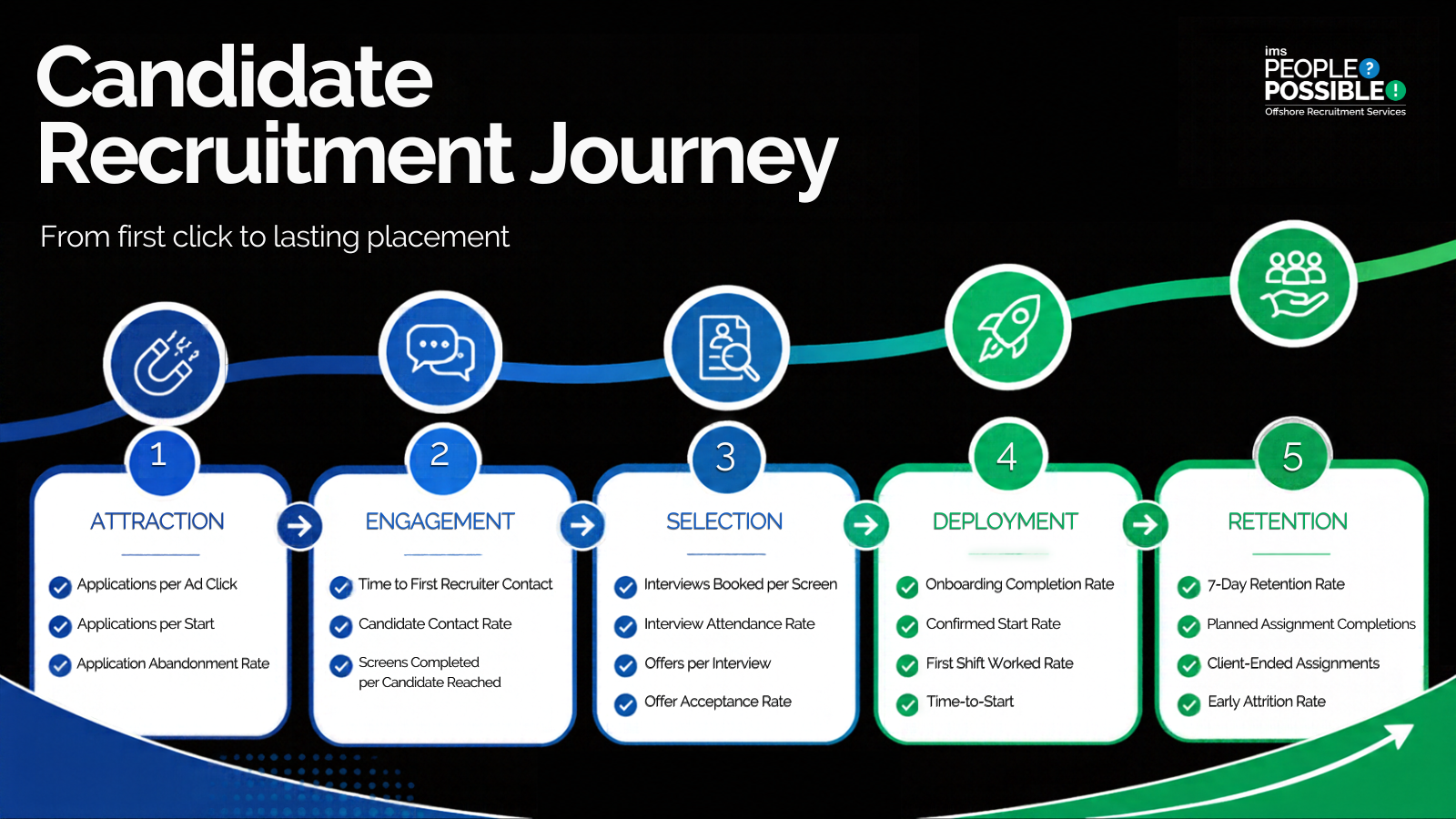
Review counts, rates, and reason codes by branch, client, role, and shift. If one branch’s overnight no-shows rise, check reporting instructions, message delivery, and commute feasibility before changing the agency-wide workflow. Then test one fix and compare the same stage across comparable hiring groups.
Set Service Targets and Give Candidates a Human Contact
Use these as starting service-level targets, not industry benchmarks. Adjust them for coverage hours, candidate communication preferences, and client requirements. Speed should remove waiting and confusion, not bypass safety, screening, or compliance steps.
| Activity | Starting target |
| Initial expression of interest | Under five minutes to complete |
| First recruiter contact attempt for high-priority applicants | Within 15–30 minutes during covered hours |
| Interview or orientation scheduling | Same day once ready to book |
| Active candidate updates | At least every 24 hours, even if the update is that a decision is pending |
| Pre-start confirmation | 24 hours before the assignment |
| Final reminder | Two to four hours before reporting time, within an appropriate contact window |
| First-day attendance check | Within 30 minutes of shift start |
| Early assignment check-ins | After the first shift and again within seven days |
The most important automation rule: every reminder needs a human route. If an associate replies, “I can’t get there at 5 a.m.,” the reply should reach a monitored queue with a named owner and backup. Use automation for routine messages, but give recruiters responsibility for exceptions. Extended-hours recruitment support can cover evening applicants and shift workers; where live coverage is unavailable, tell candidates when a recruiter will respond.
Build Candidate Pipelines Around Readiness, Not Record Count
For recurring warehouse and manufacturing roles, maintain active candidate pools by role, shift, and location. Keep equipment experience, required certifications, pay expectations, commute radius, transportation availability, start availability, previous assignment history, valid contact details, and last engagement date searchable. Refresh those details before submission. A duplicate record or stale shift preference can make a candidate look unresponsive when the underlying problem is bad data or an unsuitable offer.
Keep one accountable owner at each handoff, even when different teams handle sourcing, screening, onboarding, and consultant care. A fast submission is useful, but it doesn’t generate billable hours until the associate works.
Redesign the Workflow One Leak at a Time
Don’t redesign the whole funnel at once. Pick the stage with the largest and most fixable loss, change one thing, and compare results against the same stage before the change.
A practical sequence:
- Find the biggest controllable leak. Compare stage conversion by branch, role, shift, and client. Ignore stages with too few candidates to read reliably.
- Pull a sample of lost candidates. Review 20 to 30 records and the messages around them. Look for slow replies, wrong numbers, unclear instructions, or mismatched shifts.
- Assign a hypothesis and an owner. For example: “Evening applicants wait until the next morning for first contact. The recruiting lead owns coverage.”
- Change one variable. Shorten the form, extend contact hours, add a transportation question to screening, or send reporting instructions earlier.
- Review after a defined period. Keep the change only if conversion improves and the downstream stage doesn’t weaken. Faster scheduling that raises no-shows hasn’t solved the problem.
Most of these changes are small. The compounding effect comes from fixing several handoffs, one at a time.
Fixing a Monday No-Show Pattern
Suppose a branch sees more no-shows on Monday starts than midweek starts. The team reviews the records and finds three patterns:
- Candidates were confirmed on Thursday or Friday, then not contacted again until Monday morning.
- Several reporting instructions listed the main entrance, but the shift started at a different gate.
- Some candidates had changed their transportation arrangements after confirming.
The team doesn’t need a new sourcing channel. It needs a Sunday check-in, site-specific arrival instructions, and a transportation question at confirmation. It also needs an owner for replies and a same-hour backup contact for site access. After a few weeks, compare Monday attendance with comparable midweek starts, not the previous month’s whole branch.
That example is illustrative, not a prediction. Your records will show different causes.
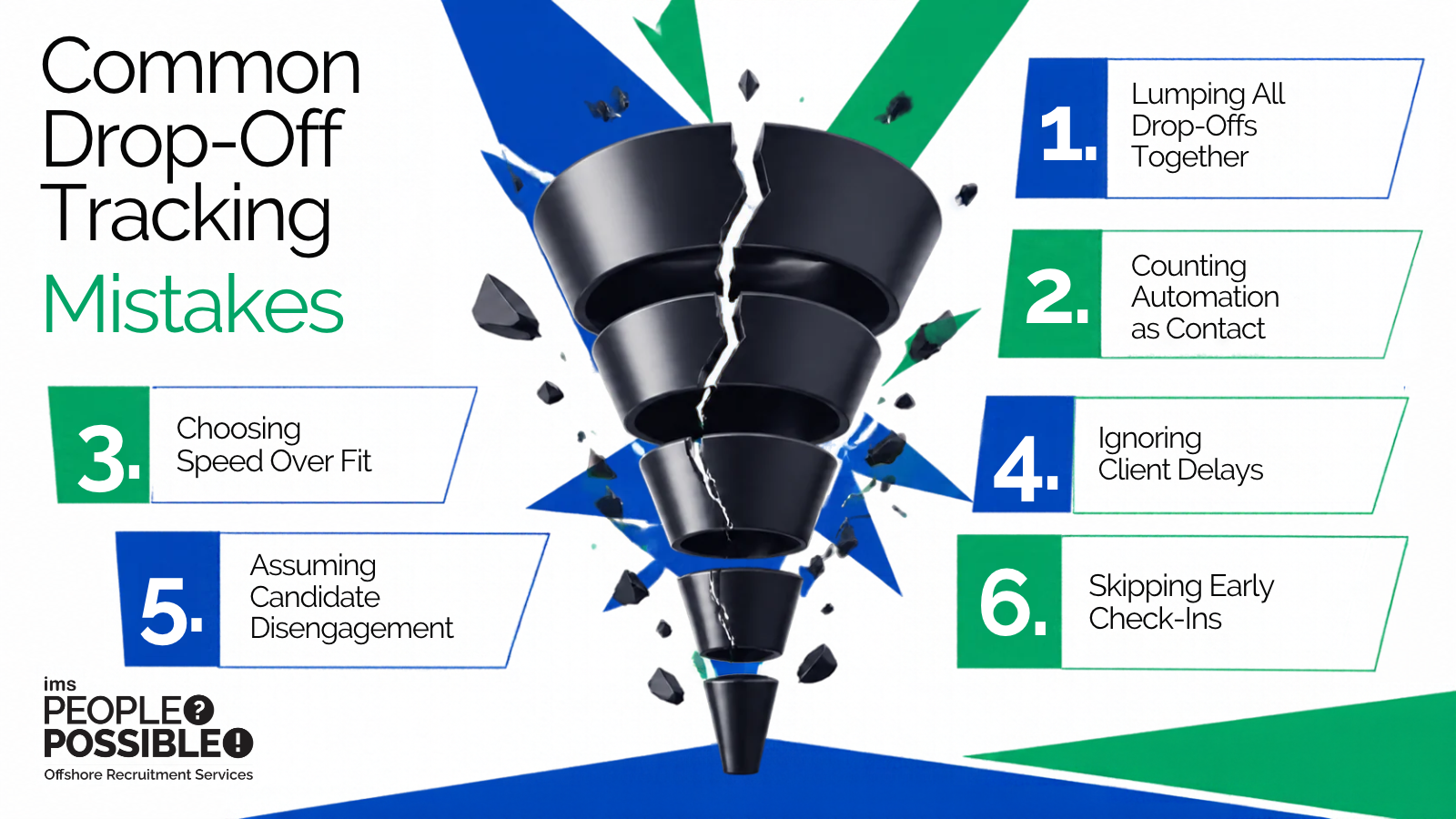
Common Mistakes to Avoid
- Treating all drop-off as one number. An applicant who abandons a form and an associate who skips day one need different fixes.
- Counting automated messages as contact. A text acknowledgment doesn’t tell you a recruiter has reached the candidate.
- Optimizing speed at the expense of fit. Fast submissions to unsuitable shifts or locations can create later withdrawals.
- Overlooking client-side delays. Slow interview feedback or changed start dates can cause candidate loss that recruiters can’t fix alone.
- Blaming candidates without reviewing records. Wrong phone numbers, duplicate profiles, and stale availability can look like disengagement.
- Ignoring early assignment feedback. The first-week check-in is often where job-preview gaps and supervisor concerns first surface.
A 30-60-90-Day Starting Plan
Days 1–30: Establish the baseline.
- Define each stage and its start and end events.
- Standardize drop-off reason codes in your ATS or CRM.
- Select one account or branch and report stage conversion, time to first contact, and first-day attendance.
Days 31–60: Test targeted fixes.
- Choose the largest controllable leak and set a service target, such as the starting targets in this article.
- Create a monitored reply route for reminders and exceptions.
- Review lost-candidate samples weekly.
Days 61–90: Standardize what works.
- Document the revised workflow, owners, and escalation path.
- Add successful changes to recruiter and coordinator training.
- Present results to client contacts, including any client-side delays you’ve identified.
- Select the next leak to address.
Questions Staffing Leaders Ask
What is a good candidate drop-off rate?
There’s no universal benchmark. Rates depend on role, shift, location, pay, source quality, and how each stage is defined. Compare your own stages over time and across similar roles.
Should we automate reminders?
Yes, for routine confirmations, provided candidates can reach a recruiter easily and replies are monitored. Automation should support responsiveness, not replace ownership.
Which stage should we fix first?
Start where the loss is large, the cause is likely within your control, and the data is reliable. Many firms begin with time to first contact or confirmed-start-to-first-day attendance because those are easy to define and act on.
How do we separate candidate choice from process failure?
Use reason codes, recruiter notes, and short follow-up conversations. A candidate who takes a better offer is different from one who never received reporting instructions.
How IMS People Possible Can Support Light Industrial Delivery
IMS People Possible works alongside staffing firms as an extension of their recruitment teams. Depending on the account, dedicated teams can support full-cycle recruitment from intake, sourcing, and screening through offer follow-up, start confirmation, and redeployment. That can include extended-hours engagement, interview and orientation scheduling, applicant tracking system and CRM updates, document tracking, background-check and drug-screen coordination, first-day check-ins, and funnel reporting. The staffing firm retains ownership of client relationships, final decisions, and escalations.
Start with one high-volume account and the handoff where the most candidates are lost. Give that step an owner, set a service target, and check whether more associates reach the next stage without shifting the problem downstream. If the bottleneck is coverage or coordination, talk to IMS People Possible about dedicated support for that part of your funnel.
Final Takeaway
Candidates rarely disappear without a reason. When you treat every abandoned application, missed orientation, incomplete onboarding step, and first-day no-show as a signal, your funnel data starts pointing at the work that needs fixing.